
 October 12, 2026
Introduction: In this article – to celebrate Family History Month in October – Gena Philibert-Ortega describes how she created and used a timeline for her paternal grandfather. Gena is a genealogist and author of the book “From the Family Kitchen.”
Week 2 of my Family History Month schedule focuses on creating a timeline. Last week I conducted a four-generation genealogy audit and identified what I was missing. This week I want to choose at least one person from my four generations to create a timeline for.
As I mentioned in my Family History Month introduction, a timeline is an important genealogy tool that too few of us use. A timeline can help you keep track of what you know about an ancestor, what you are missing, and historical events they lived through. Later, a timeline can be used to help you identify documents to find during a research trip and to write a story about that ancestor’s life.
Timelines
Timelines are one of those flexible tools that can be created in whatever way works best for you. The way I do it might not be what makes sense to you, so take some time to identify what tools you want to use and then stick to it.
You can make a timeline via:
- Your genealogy software program.
- Your online family tree program (it might have a way to show facts in a timeline).
- Your word processing software (I like to create a timeline using a Table).
- A genealogy form via a free or paid website.
- A spreadsheet program.
- A notebook and pencil. (Not everything has to be created via the computer – you do what is easiest for you. If that means using paper, pens, rulers and highlighters, then do it that way).
However you decide to create a timeline, you’ll want to make sure it includes columns for the information you want to document. This might include:
- Name of ancestor
- Date of event or document
- Type of event or document
- Abstract of what the document says
- Comments
- Source citation
Is this the only information to capture on your timeline? No, it should include whatever information you think you’ll want as you research.
My Timelines
I mentioned in my Family History Month introduction article that I didn’t think I had time this week to create 23 timelines for everyone in my four generations. Because of this, I decided to concentrate on one person that I’ve been working on: my paternal grandfather. If I have more time, I’ll create one for each of my four grandparents.
I am using two different types of timelines. One is my “working” timeline. This is the timeline I use to research. It’s the one that includes my sources and source citations. I use a word processing program and create a table with 4-5 columns that cover date, place, events, source citations, and comments (I vary this according to whom I am researching).
You can learn more about how to create this type of timeline and download a template form via this article on the GenealogyBank blog.
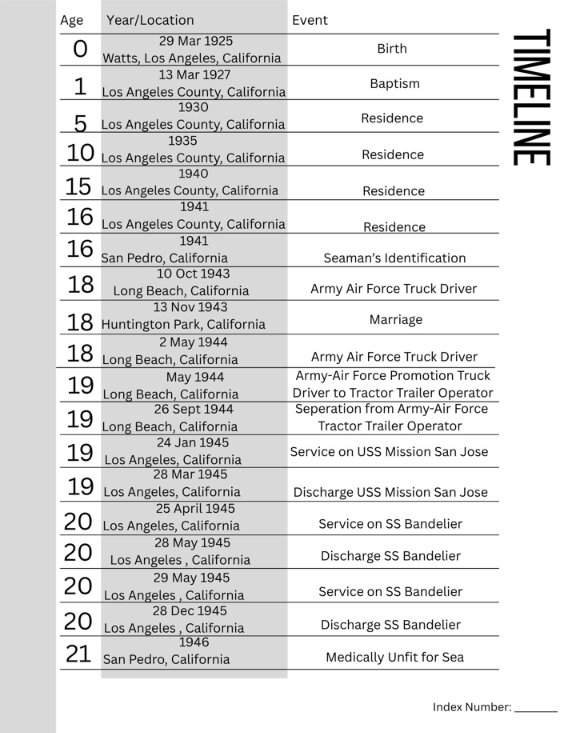
My other timeline is one that I am creating via Family Tree Notebooks that will be used in a family history book.* This one is more decorative and meant to only show age, date, place and event. It’s the one I think my family is going to be more interested in seeing. Although this is decorative, viewing it has helped me see which decades of my grandfather’s life are not documented that I need to work on.
Leo Philibert Timeline: Here is the start of my Family Tree Notebooks timeline for a book about my grandfather’s life.
Your Timeline
Now it’s your turn. Are you following along with your research? What do your timelines look like? Share your Family History Month journey in the comments below.
* Family Tree Notebooks offers forms for a fee. Family Tree Notebooks’ forms are found at https://familytreenotebooks.com/.
Create a free account at GenealogyBank for 7 days to start your journey and discover the stories your ancestors left behind.
Note on the header image: Family History Month graphic. Credit: https://depositphotos.com/home.html
Related Articles:
